
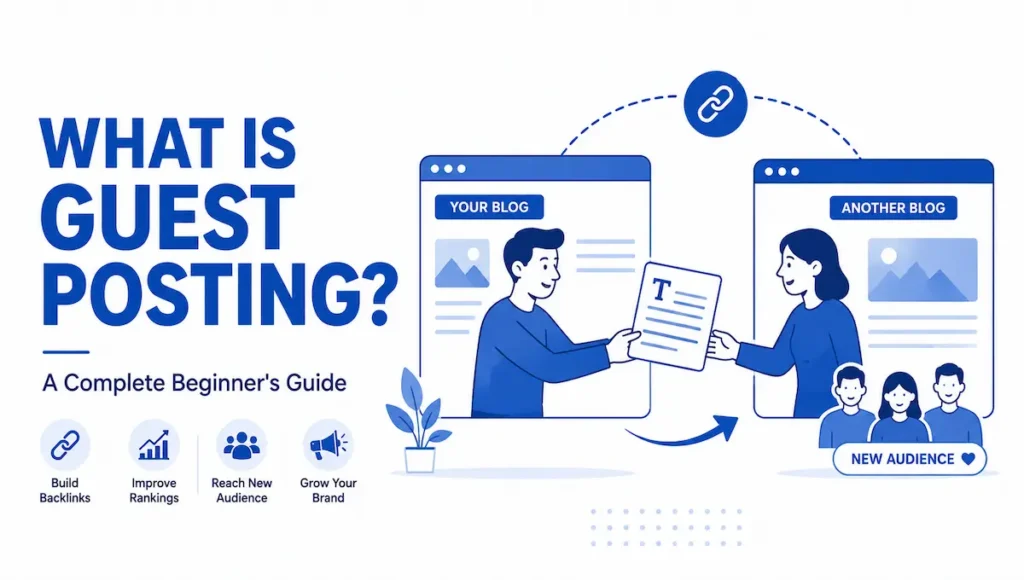
You’ve probably seen the little line at the top of a blog article — “This is . Include a naturaa guest post by…” — and wondered what the arrangement actually is. Is the writer paid? Do they work there? What do they get out of it? If you’ve ever asked what is guest posting and how it really works, this beginner’s guide answers it plainly.
In short, guest posting is one of the most popular ways writers, bloggers, and brands grow their audience and authority online — by publishing content on someone else’s website. Let’s break down exactly how it works, why people do it, and how to start the right way.
QUICK SUMMARY
- Guest posting means writing and publishing an article on another person’s website or blog.
- Two sides benefit: the writer gets exposure, authority, and a link back; the host site gets free quality content.
- Guest posting vs guest blogging: they’re used interchangeably — a tiny nuance separates them, but the practice is the same.
- Why do it: reach a new audience, build credibility, earn backlinks, and network with other creators.
- Getting started is simple: find relevant blogs, pitch a useful topic, write genuinely good content.
Guest posting is a simple, fair trade: you give a website great content, and in return you borrow its audience and its credibility for a moment. Everybody wins.
- What Is Guest Posting?
- Guest Posting vs Guest Blogging: Are They the Same?
- 5 Proven Benefits of Guest Posting.
- How to Start Guest Posting (Beginner Steps)
- How to Find Guest Posting Sites (Free Methods)
- A Copy-Paste Guest Post Pitch Template
- Is Guest Posting Free or Paid?
- What If Your Pitch Gets Rejected?
- Common Guest Posting Misconceptions
- Learn More: Guest Posting Explained
- Conclusion
- Frequently Asked Questions
- Related Reading
What Is Guest Posting?
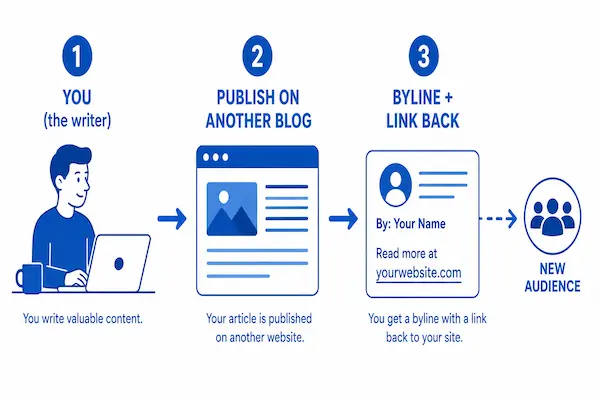
Short answer: Guest posting (also called guest blogging) is the practice of writing an article and publishing it on someone else’s website or blog — usually one in your niche. In return, the writer typically gets exposure to a new audience, an author byline, and a link back to their own site, while the host website receives free, high-quality content for its readers.
It’s essentially a win-win collaboration. Imagine being invited to speak at someone else’s event: you get in front of their crowd, and they get a fresh, valuable talk for their audience. Guest posting is the online version of that — your words, their platform, mutual benefit.
Guest Posting vs Guest Blogging: Are They the Same?
This is the most common beginner question — and the honest answer is that the two terms are used almost interchangeably. Any difference is subtle rather than strict.
| Aspect | Guest Posting | Guest Blogging |
|---|---|---|
| Core meaning | Publishing an article on another site | Publishing an article on another site |
| Common emphasis | Often framed around the SEO/backlink goal | Often framed around content & audience-building |
| Who uses the term | SEOs, link builders | Bloggers, content marketers |
| In practice | The same activity | The same activity |
Bottom line: don’t overthink it. Whether someone says guest posting or guest blogging, they mean the same thing — writing for another website. If you specifically want the SEO and backlink angle, see our detailed guide on what guest posting is in SEO.
5 Proven Benefits of Guest Posting.
Guest posting isn’t just an SEO tactic — it delivers several benefits at once, which is why bloggers and brands keep doing it:
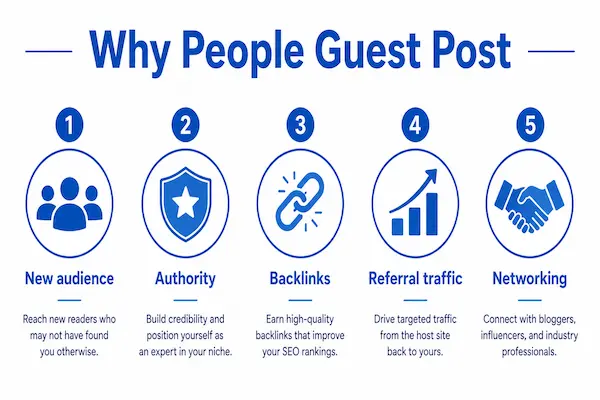
- Reach a new audience: you tap into readers you’d never reach on your own site.
- Build authority and credibility: appearing on a respected blog positions you as an expert.
- Earn quality backlinks: a link from a relevant site helps your own site’s SEO.
- Drive referral traffic: interested readers click through to learn more about you.
- Network with creators: guest posting builds real relationships with editors and site owners.
Guest blogging is consistently ranked among the most popular content and link-building strategies by marketers, as Ahrefs notes in its own research on the tactic.
How to Start Guest Posting (Beginner Steps)
Getting your first guest post published is more approachable than it looks. Follow these steps:
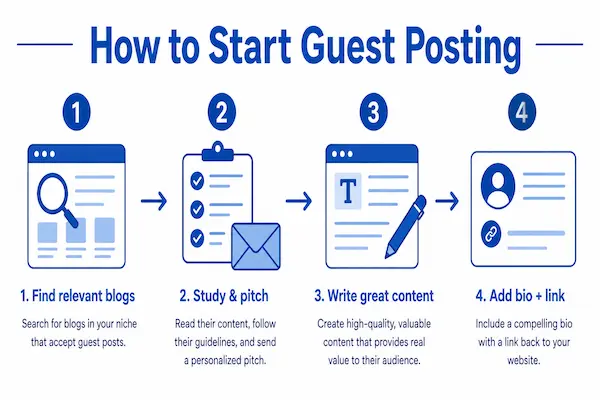
1. Find relevant blogs
Look for websites in your niche that publish guest content, have real readers, and match your topic. Relevance matters more than size.
2. Study the site and pitch a topic
Read a few of their articles, then email a specific, useful topic idea that fits a gap in their content — not a generic “can I write for you?”
3. Write genuinely valuable content
Deliver your best work — original, helpful, and matched to their audience. Good content gets accepted and stays live for years.
4. Include a natural author bio and link
Most sites let you add a short bio with a link back to your own site or profile. Keep it natural and reader-friendly.
How to Find Guest Posting Sites (Free Methods)
You don’t need a paid tool to find your first opportunities. Open Google and try these search strings, replacing your topic with your niche — sites that want guest writers usually say so on a dedicated page:
“your topic” + “write for us”
“your topic” + “guest post guidelines”
“your topic” + “submit a guest post”
intitle:”write for us” your topic
Two more free methods: look at where your competitors have already guest posted (a free backlink checker will show their referring sites), and simply reach out to blogs you personally read and enjoy. Before you pitch, run a quick quality check — the site should be relevant to your niche, publish real, recent content, and have genuine reader engagement (comments, shares, social presence). Skip anything that looks like a link farm.
A Copy-Paste Guest Post Pitch Template
The pitch is where most beginners freeze. Keep it short, personal, and specific. Here’s a simple template you can adapt — most competitors never hand you one you can actually use:
Subject: Guest post idea for [Blog Name]: [Proposed Title]
Hi [First Name],
I’ve been reading [Blog Name] for a while — your recent piece on [specific article] was genuinely useful, especially the part about [specific detail].
I’d love to contribute a guest post your readers would find valuable. Two ideas:
1. [Specific, useful title]
2. [Second specific title]
Each would be original, 1,000+ words, with real examples and no fluff — and I’ll link naturally to a couple of your existing posts. Happy to send an outline first.
Would either work for you?
Thanks,
[Your Name] — [your site or portfolio link]
Is Guest Posting Free or Paid?
Both models exist, and it’s worth knowing the difference. Many quality blogs accept free guest contributions purely because they want good content for their readers — this is the classic, editorial form of guest posting.
Some sites and marketplaces instead charge a placement fee to publish your post. That’s common in the SEO industry, but be careful: if a link is genuinely paid for, Google expects it to be marked as sponsored so it doesn’t pass ranking credit. For pure audience-building, free relevant placements are usually the smarter starting point.
What If Your Pitch Gets Rejected?
Rejection (or silence) is normal — even experienced writers hear “no” often, and most competitor guides never prepare you for it. Don’t take it personally. Send one polite follow-up after about a week, and if the answer is still no, ask briefly what would have made it a fit. Then pitch a fresh angle to the next site on your list. Guest posting is a numbers game as much as a skill game: the more relevant, personalized pitches you send, the faster the yeses come.
⚠️ Don’t treat guest posting as a link-grab
If your only goal is a backlink, it shows — and it backfires. Google’s spam policies specifically flag guest posts written mainly to place optimized links. Lead with genuinely useful content on relevant sites, and the SEO benefit follows safely.
💡 Pro tip: start with smaller, relevant blogs
Beginners often aim only at huge sites and get ignored. Start with mid-size blogs in your exact niche — they’re more likely to say yes, you’ll build a portfolio of published work, and those clips make it far easier to land bigger sites later.
From my own experience (replace with your exact figures)
When I wrote my very first guest post back in 2023, I made the classic mistake of pitching a massive, well-known blog first — and got flat-out ignored twice. So I changed tactics and pitched a mid-size blog in my exact niche instead, offering a specific how-to topic they didn’t have yet.
They said yes within a day. That single post brought around 60 referral visits in its first month and, more importantly, gave me a published clip I could point to. Within three months I’d used that one credential to land two bigger placements. The lesson: start relevant and small, and let each post open the next door.
Common Guest Posting Misconceptions
“It’s only for SEO backlinks”
Backlinks are one benefit, but exposure, authority, and relationships often matter just as much — sometimes more.
“You have to pay for every guest post”
Many quality blogs accept free guest contributions if your content is genuinely good and relevant. Payment is only one part of the wider landscape.
“Bigger sites are always better”
A relevant, engaged mid-size blog often sends more real readers (and safer SEO value) than a giant, unrelated one.
“One guest post will transform my traffic”
Guest posting compounds over time. One post helps; a consistent habit of relevant posts is what actually moves the needle.
Learn More: Guest Posting Explained
The short video below gives a beginner-friendly overview of what guest posting is and how it works — a helpful visual companion to this guide if you prefer watching to reading.
Video: “What Is Guest Posting – Everything You Need To Know About Guest Posts” — a concise beginner overview of the practice.
Conclusion
So, what is guest posting? At its heart, it’s a simple, honest exchange: you provide valuable content, and another website lends you its audience and credibility in return. It’s one of the most beginner-friendly ways to grow your reach, build authority, earn backlinks, and connect with other creators — all at once.
Start with relevant blogs, pitch topics that genuinely help their readers, and treat every post as the start of a relationship rather than a one-off favor. Do that consistently, and guest posting becomes one of the most rewarding habits in your entire content strategy.
Ready to take guest posting further?
Once you understand the basics, you can even turn guest posting into a full service business. See exactly how in our complete GBOB guide.
Frequently Asked Questions
What is guest posting in simple words?
It’s writing an article and publishing it on someone else’s website or blog, usually in exchange for exposure, an author byline, and a link back to your own site.
Is guest posting and guest blogging the same thing?
Effectively yes. The terms are used interchangeably; any difference in emphasis (SEO vs content) is minor, and both describe writing for another website.
Is guest posting free?
It can be. Many blogs accept free, high-quality guest contributions, while some paid-placement services also exist. It depends on the site and your goal.
Do I need my own website to guest post?
Not necessarily. A website helps you get a useful link and look credible, but you can also guest post to build a portfolio, authority, or social following.
How do beginners find guest posting opportunities?
Search for niche blogs that publish guest content, check their “write for us” pages, and use SEO tools or outreach. Prioritize relevance over size.
Is guest posting good for beginners?
Yes — it’s one of the most accessible ways to build authority and reach early on, especially if you start with smaller, relevant blogs.
Related Reading
- What Is Guest Posting in SEO — the backlink and ranking side, explained.
- Guest Blogging Outreach Business (GBOB) — turn guest posting into income.
- What Is Blogger Outreach — how to reach the sites you want to write for.
- How to Get Backlinks for SEO — the wider link-building picture.