
If you’ve ever pasted a URL into Google, glanced at a competitor’s blog, and wondered “how authoritative is this site, really?” — SEO Quake is probably the fastest way to get an answer without leaving your browser tab. It’s the free extension that put on-page SEO data directly into the search results page, and for outreach and content teams like ours, it’s still one of the first tools we open every day.
- SEO Quake (SEOquake) is a free browser extension built by Semrush that overlays SEO data — SEMrush Rank, indexed pages, backlinks, keyword density — right on top of Google’s search results.
- It works on Chrome, Firefox, and Edge desktop browsers only — there is no official Android or iOS app.
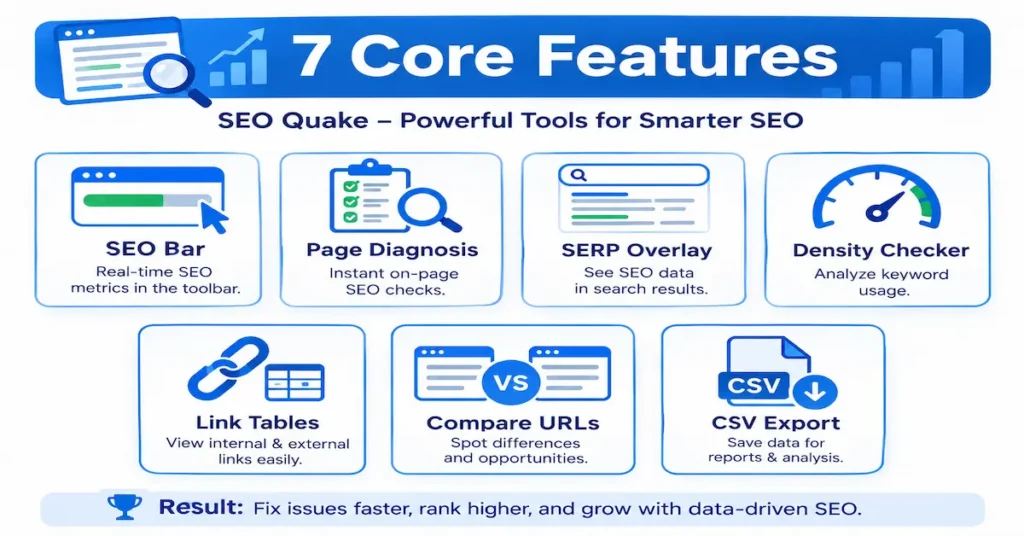
- Its 7 core tools (SEO Bar, Page Diagnosis, SERP Overlay, Density checker, Link tables, Compare URLs, CSV export) cover most quick-audit needs for free.
- We use it daily to vet guest posting and blogger outreach prospects before sending a single pitch email.
- It’s a screening tool, not a full audit platform — pair it with Google Search Console and a real crawler for anything beyond a quick check.
“It won’t replace Semrush or Ahrefs — but for a 30-second gut-check on a site’s SEO health, nothing free comes close.”
What Is SEO Quake?
Short answer: SEO Quake is a free browser extension made by Semrush that shows on-page and off-page SEO metrics — like SEMrush Rank, indexed pages, backlinks, and keyword density — directly inside Google’s search results and on any page you visit.
It launched years before most modern SEO toolbars and is still maintained by Semrush today, which is exactly why it shows up in so many comparison searches against MozBar and the Ahrefs toolbar — it was one of the first tools to make this kind of data glanceable instead of buried in a dashboard.
Key Features
Everything it does lives inside one small toolbar, but it packs in seven genuinely useful checks:
- SEO Bar — a one-line summary of Google index status, cache date, and age for the page you’re on.
- Page Diagnosis — flags missing title tags, duplicate meta descriptions, broken heading structure, and other on-page basics.
- SERP Overlay — adds SEMrush Rank, backlinks, and indexed-page counts directly under every Google result.
- Keyword Density Checker — a quick word-frequency table to sense-check obvious over-optimization.
- Internal & External Link Tables — a fast way to see every link on a page without opening view-source.
- Compare URLs — puts two pages side by side across the same metric set.
- CSV Export — pulls any of the above into a spreadsheet in one click.
None of these are deep-crawl replacements — they’re meant to be read in under a minute, which is exactly their value. For a deeper technical breakdown of each metric, Backlinko’s SEO Quake hub is a solid reference.
How to Install SEO Quake (Chrome, Firefox, Edge)
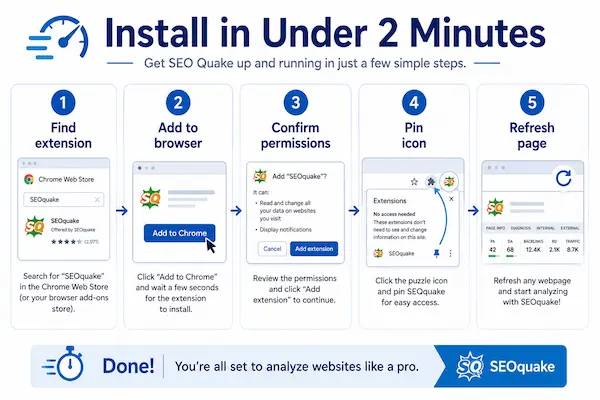
Installation takes under two minutes on any Chromium-based browser:
- Go to the Chrome Web Store (or Firefox Add-ons store) and search “SEOquake.”
- Click Add to Chrome (or Add to Firefox) and confirm the permissions prompt.
- Pin the extension icon to your toolbar so it’s always one click away.
- Open any webpage — the SEO Bar should appear automatically at the top.
- If nothing shows, refresh the page once; extensions occasionally need a reload after install.
One thing worth knowing up front: the extension does not have an Android or iOS app. It’s built purely as a desktop browser extension, so if you searched “seoquake for android” hoping to check sites from your phone, you’ll need a mobile-friendly alternative like a browser-based SEO checker instead.
How We Use It to Vet Blogger Outreach Prospects
This is where it earns its place in our actual workflow, not just as a definition to write about. Before we pitch any blog for a guest post or link placement, we run the domain through it first — it takes about 20 seconds and saves us from wasting a pitch on a low-value site.
The three numbers we check first: indexed pages (is this a real, active site or a shell?), the internal/external link ratio on the target page (too many outbound links dilutes link equity), and SEMrush Rank as a rough traffic proxy. If a “high authority” blog someone is offering us shows almost no indexed pages, that’s a red flag before we even open Ahrefs for a deeper look.
Metrics Explained
| Metric | What It Shows | How Reliable It Is |
|---|---|---|
| SEMrush Rank | Semrush’s own traffic-based ranking, not Google’s | Directional only |
| Indexed Pages | Pages Google has indexed for the domain | Reliable |
| Internal/External Links | Link counts on the current page | Reliable |
| Keyword Density | Word-frequency %, not a Google ranking factor | Use as a sense-check only |
| Diagnosis Score | Basic on-page checklist score | Good for a first pass |
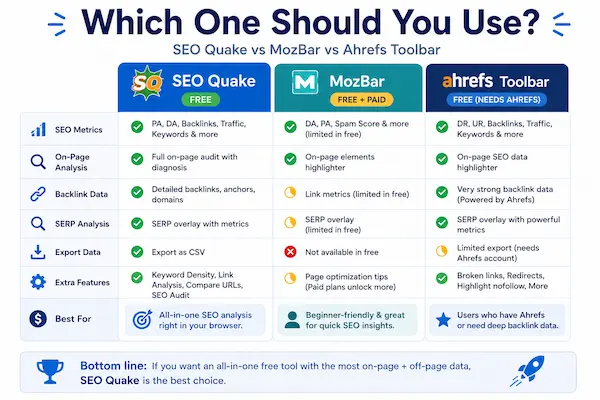
SEO Quake vs MozBar vs Ahrefs Toolbar
| Extension | Price | On-Page Audit | Best For |
|---|---|---|---|
| SEO Quake | Free | Basic checklist | Fast outreach/prospect screening |
| MozBar | Free + paid tier | Domain/Page Authority focus | Link-authority comparisons |
| Ahrefs Toolbar | Free (needs Ahrefs data) | Backlink-heavy | Deeper backlink research |
Common Mistakes to Avoid
Confusing “SEO Quake” With “SEO Quack”
These are the same tool — “SEO Quack” is simply the most common typo/mishearing of “SEOquake.” If you landed here searching either spelling, you’re in the right place.
Expecting an Android or iOS App
As covered above, it is desktop-browser-only. There’s no mobile app, official or otherwise.
Treating SEMrush Rank as a Google Ranking Factor
It’s Semrush’s own estimate, useful for quick comparisons, not something Google itself produces or uses.
“SEO Quake Not Showing” After a Browser Update
Usually fixed by toggling the extension off/on in your browser’s extensions menu, or reinstalling if a recent Chrome/Firefox update reset permissions.
Relying on One Metric Alone
No single number — not Diagnosis Score, not SEMrush Rank — tells the full story. Combine at least two or three before making a decision.
Learn More: Watch It in Action
This walkthrough shows the extension being used in a real workflow, which is the fastest way to see whether it fits yours:
Conclusion
SEO Quake is still one of the fastest free ways to get a read on any page’s basic SEO health without leaving Google’s results — and for outreach-heavy workflows like ours, that speed is the whole point. Use it for the quick first pass, then bring in a full platform like Semrush or Ahrefs when a prospect or competitor is worth a deeper look.
Want your outreach prospects vetted properly, every time?
Our team screens every guest-post opportunity the way this guide describes — and further.
Frequently Asked Questions
What is SEO Quake used for?
Quickly checking a page or domain’s on-page SEO, indexed pages, backlinks, and keyword density directly inside Google’s search results, without opening a separate dashboard.
Is it free?
Yes, the browser extension itself is completely free. Some data points (like deeper backlink history) point back to Semrush’s paid plans if you want more detail.
Is “seo quack” the same as SEO Quake?
Yes — “seo quack” is just a common misspelling of SEOquake. Same tool, same extension.
Does it work on Android or iPhone?
No. It’s a desktop browser extension only (Chrome, Firefox, Edge) — there’s no official mobile app.
Why is it not showing up on pages anymore?
Usually a browser update reset extension permissions — toggle it off and on, or reinstall it from your browser’s extension store.
Is it better than MozBar for beginners?
It is generally easier for a fast multi-metric glance; MozBar leans harder into Domain/Page Authority specifically. Many people run both.