
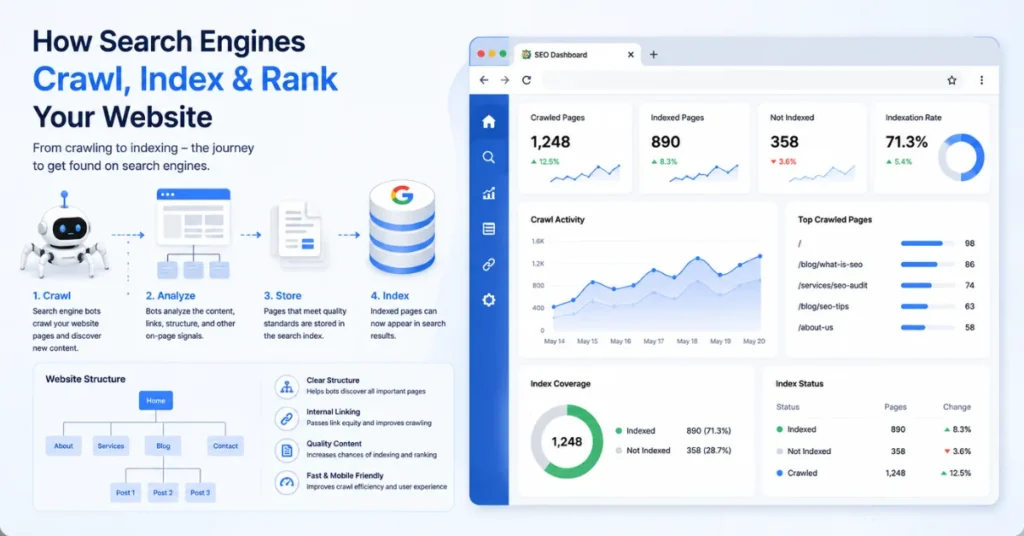
Many SEO beginners wonder how Google finds a website and decides whether a page should appear in search results or not.
The answer lies in two important SEO processes: crawling and indexing.
Even high-quality content cannot rank until search engines discover and properly index it. I personally experienced this when one of my blog posts failed to appear on Google despite being well-written. Later, I found that the page had not been indexed correctly.
In this guide, you will learn what is crawling and indexing in SEO, why they matter in SEO, common indexing issues, and practical ways to help search engines find your content faster.
- What Is Crawling and Indexing in SEO?
- What Is Crawling in SEO?
- Why Crawling Matters for SEO
- What Is Indexing in SEO?
- Crawling vs Indexing: What's the Difference?
- How Google Crawls a Website
- Common Reasons Pages Are Not Indexed
- How to Check If a Page Is Indexed
- How to Improve Crawling and Indexing
- What Is Crawling and Indexing in SEO? (Video Guide)
- How Crawling and Indexing Affect Rankings
- Practical Example From Real SEO Work
- Signs Google Is Crawling Your Website
- Real SEO Question from Our Local SEO-Batch-2 Community
- FAQ Section
- Final Thoughts
What Is Crawling and Indexing in SEO?
Crawling and indexing are two separate but connected processes used by search engines.
Crawling
Crawling is the process by which search engine bots visit web pages and discover content across the internet.
Indexing
Indexing is the process by which search engines store and organize discovered pages in their database.
Think of it like a library:
- Crawling = finding new books
- Indexing = adding books to the library catalog
- Ranking = deciding which books to show first
A page must typically be crawled before it can be indexed.
What Is Crawling in SEO?
Crawling refers to how search engines discover pages online.
Google uses automated programs known as Googlebot to visit websites and scan content.

The crawler looks at:
- Page URLs
- Internal links
- Images
- Videos
- Metadata
- Structured content
When Googlebot visits a page, it follows links to discover additional pages.
For example:
Home Page → Blog Page → SEO Article → Internal Link → Another Article
This chain helps search engines uncover new content.
How Search Engines Discover Pages
Search engines find pages through:
- Internal links
- Backlinks
- XML sitemaps
- Previously indexed pages
- URL submissions
A well-structured website makes crawling easier.
Related:
What Is On-Page SEO? A Powerful Beginner’s Step-by-Step Guide
Why Crawling Matters for SEO
Without crawling, search engines cannot discover your content.
If a page is never crawled:
- It won’t be indexed.
- It won’t rank.
- It won’t receive organic traffic.
Common crawl issues include:
- Broken links
- Orphan pages
- Incorrect robots.txt settings
- Server errors
- Poor site architecture
This is why technical SEO audits often begin by checking crawlability.
What Is Indexing in SEO?
After a page is crawled, Google evaluates whether to add it to its index.
The index is a massive database containing information about web pages.
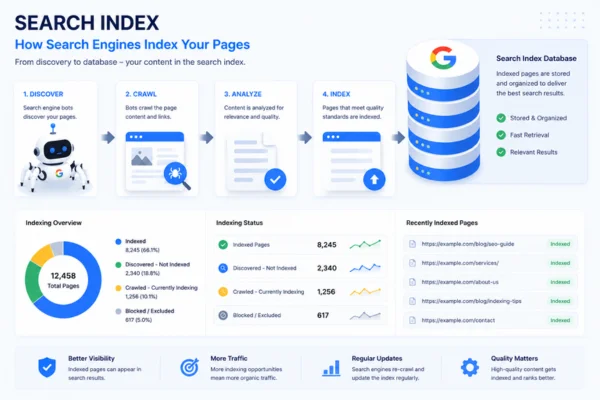
When someone searches Google, results are retrieved from the index—not directly from the live web.
If your page isn’t indexed, it usually won’t appear in search results.
What Information Does Google Index?
Google may store:
- Page content
- Headings
- Keywords
- Images
- Meta information
- Structured data
- Internal links
The better Google understands a page, the easier it becomes to rank it for relevant searches.
Related:
What Is SEO? Simple Explanation Guide for Beginners
Crawling vs Indexing: What’s the Difference?
Many beginners assume crawling and indexing mean the same thing.
They don’t.
| Crawling | Indexing |
|---|---|
| Discovering pages | Storing pages |
| Done by crawlers | Done by search engine databases |
| First step | Second step |
| Finds content | Organizes content |
| Doesn’t guarantee ranking | Doesn’t guarantee ranking |
A page can be crawled but not indexed.
For example:
- Thin content
- Duplicate content
- Low-value pages
- Noindex directives
may prevent indexing.
How Google Crawls a Website
The process usually looks like this:
Step 1: Discover URL
Google finds a URL through:
- Internal links
- Backlinks
- Sitemap
Step 2: Visit Page
Googlebot accesses the page.
Step 3: Analyze Content
The bot reads:
- Text
- Headings
- Links
- Metadata
Step 4: Follow Links
Additional pages are discovered.
Step 5: Evaluate for Indexing
Google determines whether the page deserves inclusion in its index.
Step 6: Store in Index
Approved pages become searchable.
Common Reasons Pages Are Not Indexed
Many website owners publish content and expect instant rankings.
However, pages often fail to index due to:
1. Noindex Tags
A noindex directive tells Google not to index a page.
2. Poor Content Quality
Thin or low-value content may be ignored.
3. Duplicate Content
Multiple versions of the same page can confuse search engines.
4. Crawl Restrictions
Incorrect robots.txt rules can block crawlers.
5. Orphan Pages
Pages without internal links are harder to discover.
6. Server Problems
Frequent downtime can interrupt crawling.
How to Check If a Page Is Indexed
The easiest method is using Google search.
Type:
site:yourdomain.com/page-urlIf the page appears, it is indexed.
If it doesn’t appear, Google may not have indexed it yet.
You can also use:
- Google Search Console
- URL Inspection Tool
- Site search operators
How to Improve Crawling and Indexing

Fortunately, there are several proven ways to help search engines discover and index your content.
Create an XML Sitemap
Sitemaps provide search engines with a roadmap of important pages.
Build Strong Internal Links
Internal linking helps search engines navigate your site efficiently.
A page with several internal links is usually crawled faster than an orphan page.
Related:
What Is Link Building in SEO and Why It Matters
Publish High-Quality Content
Google prioritizes useful and original content.
Focus on:
- User intent
- Topic depth
- Practical examples
- Fresh information
Fix Broken Links
Broken links waste crawl resources and create poor user experiences.
Regular audits help identify issues early.
Submit URLs Through Google Search Console
You can request indexing for newly published content.
This often speeds up discovery.
Improve Website Structure
Organize content logically.
Example:
SEO
→ On-Page SEO
→ Technical SEO
→ Link Building
→ Local SEO
Clear structures improve crawl efficiency.
What Is Crawling and Indexing in SEO? (Video Guide)
How Crawling and Indexing Affect Rankings
Crawling and indexing alone do not guarantee rankings.
However, they are prerequisites.
Before a page can rank:
- Google must discover it.
- Google must crawl it.
- Google must index it.
- Google must evaluate relevance and authority.
Only then can ranking occur.
Practical Example From Real SEO Work
During technical SEO audits, one common issue is finding pages that exist but receive no internal links.
Using tools like SEO Quake and manual site reviews, we’ve often discovered valuable content hidden several clicks deep within a website.
After improving internal linking and updating XML sitemaps, those pages were crawled and indexed more frequently.
This demonstrates how proper site structure directly influences search visibility.
Signs Google Is Crawling Your Website
You may notice:
- New pages appearing in Search Console
- Crawl statistics increasing
- Indexed page counts are growing
- Cached versions appearing in Google
- Organic impressions increasing
These signals indicate search engines are actively interacting with your content.
Real SEO Question from Our Local SEO-Batch-2 Community
Anam Ilyas asked:
“My service pages are not getting indexed even though they have quality content, green Yoast scores, and internal links. Do pages need backlinks before Google indexes them?”
Nadera Kapoor answered:
“No. Pages can be indexed without off-page SEO or backlinks. Google mainly needs to be able to crawl the page through internal links, XML sitemaps, and proper technical SEO. Backlinks help improve authority and rankings, but they are not required for indexing.”
Key Takeaway:
If your page is not being indexed, first check crawlability, indexing settings, sitemap submission, content quality, and internal linking before worrying about backlinks.
FAQ Section
Can a page be indexed without backlinks?
Yes. Google can index pages without backlinks if they are crawlable, included in the sitemap, properly linked internally, and contain valuable content.
What is crawling and indexing in SEO?
Crawling is the process of discovering web pages, while indexing is the process of storing those pages in a search engine database.
Can a page be crawled but not indexed?
Yes. Google may crawl a page but decide not to index it due to low-quality content, duplicate content, or technical restrictions.
How long does indexing take?
It can take anywhere from a few hours to several weeks, depending on site authority, crawl frequency, and content quality.
How can I check if my page is indexed?
Use Google’s site search operator or Google Search Console’s URL Inspection Tool.
Why is crawling and indexing important for SEO?
Without crawling and indexing, search engines cannot discover or display your content in search results.
What is the difference between crawling and indexing in SEO?
Crawling is the process by which search engines discover and scan web pages by following links and reading content. Indexing happens after crawling, when the search engine analyzes the page and decides whether to store it in its database so it can appear in search results. In simple terms, a page must be crawled before it can be indexed, but not every crawled page gets indexed.
Final Thoughts
Understanding what is crawling and indexing in SEO is essential for anyone learning search engine optimization.
Crawling helps search engines discover content, while indexing stores that content in searchable databases.
Without these processes, even exceptional content cannot rank.
By improving site structure, internal linking, content quality, and technical SEO, you make it easier for search engines to find and index your pages, creating a stronger foundation for future rankings and organic traffic growth.